


 01
01Upload a front-facing portrait
Use a recent photo with even lighting and a clear face — adult and baby passport photos both work.
Make ID and passport photos for free with no login, choose from multiple sizes, and download instantly.
Or drag, drop, or paste an image here
01Use a recent photo with even lighting and a clear face — adult and baby passport photos both work.
 02
02Our portrait model removes the background automatically.
 03
03Choose from ID photo sizes such as US passport and visa, plus a background color.
 04
04Download a high-resolution file ready for online applications or printing.
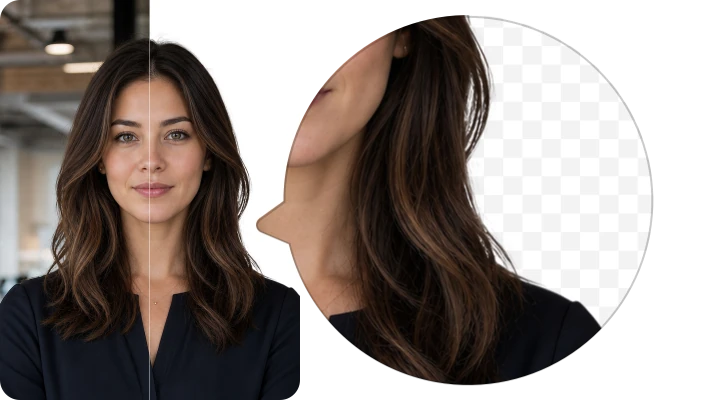
Soft hair edges and facial contours stay natural — critical for passport-style photo acceptance.
Switch between passport and ID sizes and various background colors, ready to submit or print.
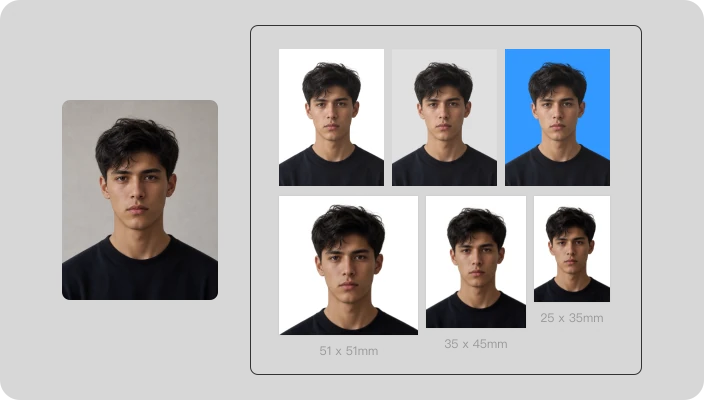
From renewals to family travel, use built-in size options and print layouts for common ID needs.
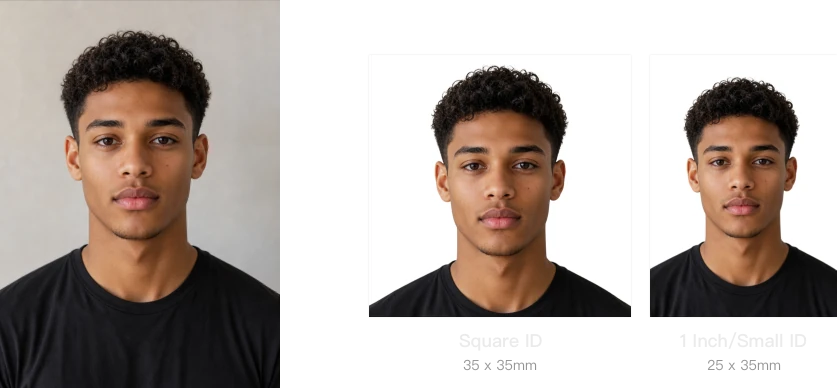
Upload a front-facing portrait to CocoAI's ID Photo Maker — AI removes the background and applies a compliant backdrop. Pick your ID photo size (Standard Passport 35×45mm, US Passport 2×2", 1-inch, 2-inch, and more), then download for free — no login needed.
Built-in sizes include Standard Passport 35×45mm, US Passport 2×2" (51×51mm), 1-inch 25×35mm, 2-inch 35×49mm, Large Format 50×70mm, and Square 35×35mm. Pick a size and the tool auto-crops and layouts.
Yes. Choose from common ID photo colors — white, light gray, blue, red — or pick any custom color with the color picker. Changes preview instantly.
The tool provides standard sizes and compliant backgrounds suitable for most everyday use. Before submitting for a visa or passport, always double-check the latest requirements from your destination country or agency.
Process images automatically in bulk. Speed up your workflow using CocoAI API. With just a few lines of code, you can bring this technology into your application.
Get API Key